

For any brand that hopes to thrive in 2020, we probably don't need to remind you that mastering Facebook marketing is a must.
You already know that there is a massive following on Facebook. Every month, a whopping 2.4 billion individuals use it.
But you do not know how many people use Facebook to connect with companies of all sizes. For instance, two-thirds of Facebook users say they visit the Facebook page of a local company at least once a week.
Potential clients are already on Facebook looking for companies like yours. The only way to tap into this current audience is through a simple, focused Facebook marketing campaign. Your Business Page is "a pillar of[your] online identity," as Facebook puts it.
Here are our best Facebook marketing tips for the year ahead.
Table of contents :
Guide to setting up Facebook for company step-by - step
Types of posts on Facebook
How to create a Facebook marketing strategy in 7 simple way
Best Guide to setting up Facebook for company step-by - step :
Setting up a Facebook page doesn't cost anything. You can also use it to post content, connect to your website, and interact with fans and followers for free once you've built your profile.
For any marketer working with a limited budget, that makes a Facebook page an incredibly valuable tool.
Before you can start using paid marketing tactics on Facebook, like Facebook advertising, you will need to build a Facebook Business Page. So, planning your Facebook page is the first step to mastering how to use Facebook for business.
Here’s how:
1. Create your Own Facebook Business Page
- Head to facebook.com/pages/create. You need to be logged into a Facebook personal account to get started, but your personal information will not appear on your new business page.
- Choose your page type: Business/brand or Community/public figure
- Enter your business details.
2. Add brand images
Upload your profile and cover photos. Make sure to use the optimum image sizes for Facebook so they look their best.
3. Complete your Page info
Click Edit Page Info and fill in the following sections:
- Description: 255 characters to describe who you are and what you do.
- Contact information: Fill in all the ways you want people to be able to reach you (including your website).
- Extra options: If it’s relevant to your business, add your operating hours, price range, and privacy policy.
4. Create your Facebook username (aka your vanity URL)
Your username helps people find you on Facebook. Click Create Page @Username to make one. It can be up to 50 characters long.
Facebook marketing ideas for your vanity URL:
- Choose a search-friendly Page name. In most cases, this will be your brand name.
- If possible, use a consistent username across social networks.
5. Add a call-to-action button
A call-to - action button provides a fast and easy way for people to reach you, shop for your goods, or otherwise connect with your business. To set one up, click Add a Button under your cover photo.
6. Review your Facebook Page settings
You have custom control over who sees what on your page through your Facebook Page settings. Take a look to ensure that you understand, in particular, the privacy and security settings.
That’s it! Your Facebook Page is set up and ready to go.
Types of Facebook posts
Now that you’ve created your Facebook Page, you need to think about what kind of content to post.
Here's a bre of the various forms of posts you can use to communicate with your followers. We've included some strong Facebook marketing examples from popular brands for inspiration.
Facebook text post (a.k.a. status post)
This is the most basic type of Facebook post. It is literally nothing but next: No photos, no videos—not even a link.
A text-only post can’t direct people to your website or drive conversions, but it can be used to spark engagement on your Page. Asking a question can be a great way to get people involved, like Kylie Jenner did in this post:
This simple question brought in more than 2,000 comments.
Even better, it brought in loads of customer feedback that Kylie can now use to craft YouTube content that she knows will resonate with fans. Asking your fans what they want can be a great way to figure out what to post.
Facebook photo post
A photo post is designed, like a text post, to create awareness or spark interaction. Picture posts in general have much higher interaction than text posts.
Photo posts are a great way to display your items, especially if they have high visual appeal, or if they are something that individuals need to see in use to fully appreciate.

A short video post can be compelling if your product has strong visual appeal.
Since videos start to play automatically in the News Feed, even a clip that’s only a few seconds long can be a great way to catch someone’s eye.
Longer video posts are a better bet for ongoing series or sharing memorable content. If you’re using video to tell a story, Facebook recommends taking at least one minute, and ideally three minutes or more.
It’s clear that video posts can be an important way to connect with followers. They see even higher engagement rates than photo posts do.
Facebook Live video post
Not unexpectedly, Facebook Live Video is a live video broadcast on Facebook. It can be a great way to give a behind-the-scenes look at your company, your product, or the personalities behind your brand to followers.
People are into it: More than two billion people have viewed a Facebook Live video since the launch of Live in 2016.
Live is a perfect format for sharing announcements in real time or directly communicating with your followers.
Whether you love him or hate him, for instance, there's no doubt that UK Prime Minister Boris Johnson understands Facebook Live 's influence. His videos from # PeoplesPMQs get hundreds of thousands of views.
Keep in mind that anything can happen when you go live, so be sure to prepare ahead of time by reading our complete guide to Facebook Live video.
Facebook poll post
We stated above that it can help get your Facebook audience interested by asking a question. A survey on Facebook takes this a step further.
A poll gives the ability for fans to vote for one of two choices. The results become public until voting is done.
On its Facebook page, the UK domain provider 123 Reg also uses surveys. The topics are also not specifically connected to their product offering, but they are still a good way of keeping followers involved:
This kind of Facebook marketing strategy with a soft touch will help create brand awareness.
Facebook Stories
Facebook Stories are photo posts or short video posts that appear in vertical format after 24 hours and vanish. At the top of the News Feed, they live. For five seconds, images appear, and videos can be up to 20 seconds long.
Every day, more than half a billion people post stories on Facebook. Stories will provide a powerful way to communicate with fans when you're thinking about how to use Facebook for business in 2020. And because stories appear at the top of the news feed, the Facebook algorithm is immune to them.

Pinned post
A pinned post is simply a regular post that you “pin” to the top of your Facebook Page.
It’s always the first thing people see at the top of your Page.
What kind of pin do you need? Perhaps you've got one piece of content that soars above the rest. Anything that really captures your brand and illustrates precisely why your page should be liked by potential followers.
Also, you can use this room for:
👉share important news
👉Highlight an amazing video
👉Raising awareness of an ongoing campaign
You can potentially use it for something that will get individuals to interact with your brand. And as much as you want, you can adjust your pinned message.
When you see a little blue thumbtack icon on the top right of the page, you can tell that a post is pinned.

How to choose the perfect type of post
So, how can you figure out exactly what types of post to use?
Engaging in social listening is one great way to learn what might resonate with your audience. This may assist you to learn:
- What do existing customers love about your company or your products?
- What challenges are people having that you know your product could help them address?
- How can you differentiate yourself from the competition?
You can start by posting content that on other channels performs well. Did you tweet content that got a great response? Also, post it on Facebook. Do you have a page that always gets new feedback on your blog? That's another candidate for a Facebook post.
Be sure to share the content using cross-promotion best practices, rather than merely cross-posting, for the best results.
How to create a Facebook marketing strategy in 7 easy steps
Now that you understand the different kinds of Facebook posts, let’s look at some Facebook marketing ideas to help you build a solid strategy for this powerful social tool.
1. Define your audience
To engage your audience effectively, you have to first understand who your target audience is.
Ask yourself the following questions:
- How old are your target followers?
- Where do they live?
- What kind of jobs do they have?
- What are their challenges and pain points?
- How and when do they use Facebook?
To start, make sure that you understand the basic demographics of Facebook. Take a look at Facebook User Analytics until you know who uses the site and how it maps back to your target customer.
Use Audience Insights to drill down into the nitty-gritty details about potential customers. You can use this tool to find information on things like:
- Age
- Gender
- Education
- Relationship status
- Location
- Language
- Facebook usage
- Past purchasing activity
To effectively use the site, this is one of the most critical Facebook marketing tips: Always have a good picture of exactly who you are trying to meet.
2. Set goals
Focusing on vanity metrics can be enticing, such as racking up Views. But if these likes are not part of a larger marketing campaign, they won't make a major return.
You have to have specific objectives linked to real business goals for your Facebook marketing campaign to be successful.
For every company, the priorities can vary, but they should all concentrate on actions that have a real effect on the bottom line. For instance:
➤Lead Generation
➤increasing conversions on your website
➤Improving support for customers.
A good place to start is those large categories. Next, you need to make your targets even more precise and observable. We suggest utilizing a recognized target-setting system here, such as S.M.A.R.T. targets or the O.K.R. goal framework.
In our article on social media target setting, we explain all of these goal-setting mechanisms, along with examples of how they operate in practice.
Anything you do on Facebook should work to help your goaa, every post, every tweet, every ad
Everything you do on Facebook—every post, every comment, every ad—should work to support your goals. To keep things on track, it’s a good idea to distill your strategy down into a Facebook mission statement for your brand.
Having a clear picture of your goals will also help you craft an effective Facebook style guide for your brand. This will make sure you maintain a consistent brand voice that works to support the goals you choose.
3. Plan your content mix
You need to build a roadmap for how to accomplish them once you've set your goals.
Determining the correct content mix is a vital part of the strategy. We suggest beginning with either the 80-20 rule or the third-party social media rule.
If you follow the 80-20 rule:
- use 80% of your Facebook posts to inform, educate, and entertain
- Use the other 20% to promote your brand
Note that it is all about building relationships to use Facebook for company, and self-promotion is not a great way to do that. But if you have plenty of value, in the 20 percent of posts that are more sales-focused, your audience will be open to learning about your goods and services.
The social media rule of thirds also prescribes a good mix of valuable content vs. promotional posts:
- one-third of your content should share ideas and stories
- one-third should involve personal interactions with your followers
- the remaining third can promote your business
The goal is to provide more value than promotional material to keep followers engaged.
Brands that drive sales too hard will still be penalized by Facebook's algorithm. Facebook wants the news feeds of its users to be loaded with content that they want to like and share.
You should like that, too, as a marketer. All of those likes and shares help broaden your scope and put your product in front of new eyeballs.
Determining when and how much to post is the final art of preparing your content mix.
This will take some trial and error (using engagement data gleaned from Page Insights). But research generally shows that the best time to post on Facebook is:
- For B2B brands: between 9 a.m. and 2 p.m. EST on Tuesday, Wednesday, or Thursday.
- For B2C brands: 12 p.m. EST on Monday, Tuesday, or Wednesday
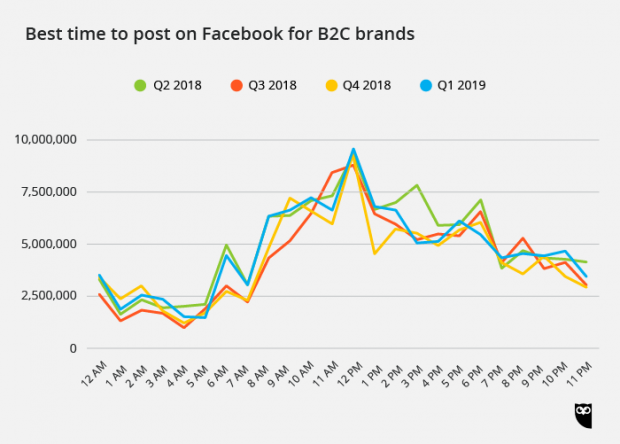
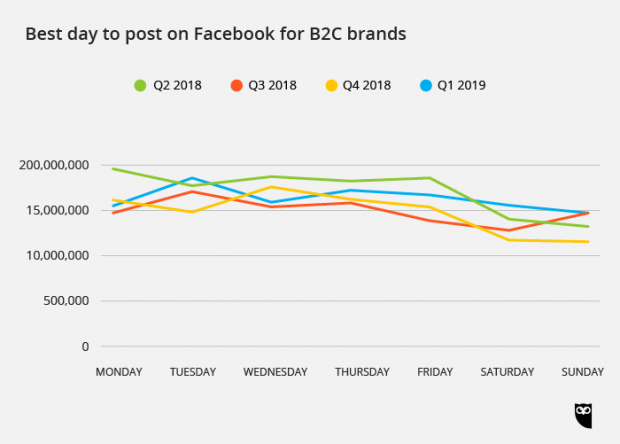
It’s important to post consistently. Create a content calendar to help balance your mix of content types and keep your posting schedule on track. We’ve created a free content calendar template you can use. The Hootsuite Planner is another great resource to help you plan and manage your Facebook content mix.
For more strategic planning ideas, check out our post on how to create a social media marketing plan.
4. Optimize your Page for engagement
You need to make it easy for people to find your Facebook page in order to meet the Facebook marketing objectives you set in Phase No. 2. And you have to push them, once they get there, to like your website.
As illustrated in this video, start by making sure your Facebook Business Page is completely optimized for success:
Tip: Put some extra effort into the cover picture of your Facebook profile, because when they visit your page, it's the first thing people can see.
Next, it’s time to get those views, Likes, and Follows rolling in.
First, make it easy for people you already interact with on other channels to find your Facebook Page:
- Link to your Page in your email signature, newsletter, and other channels
- Incorporate Facebook Like and share buttons on your website and blog to make it easy for people to find, follow, and share your Page in one click
Of course, you need to make sure the content you post to Facebook is highly shareable if you want individuals to share your content. The best way to extend your organic reach is to produce useful and engaging content that followers would be delighted to share with their connections.
That Facebook is a social network must be repeated here. If you're not active with your website, why should they be your followers? For more sensitive brands, followers who find themselves speaking in a vacuum will leave your website.
Your slogan is response, answer, answer. Respond to any comment and post. React to questions.
Ultimately, make sure that your website is up to date. To search for and delete any obsolete posts, schedule a periodic audit of your Facebook profile. Make sure you are correct, up-to - date and on-brand in your About section.
In our Facebook Likes guide and this list of little-known Facebook tips and tricks, you can find more comprehensive strategies.
5. Consider using other Facebook tools
Once you’ve started to build up your following, you may want to consider adding some extra tools to your marketing plan.
Facebook Groups
With 1.4 billion users per month using Facebook groups, it's too huge an audience to ignore. Think of your local coffee shop or community center as the online version of parties. They are a forum for knowledge and ideas to be exchanged by people.
Facebook groups can also be used to highlight your experience and provide your fans with added value. This is a perfect way to create trust and enduring loyalty.
For example, a private Facebook group is provided by Shirley Weir of Menopause Chicks where women can chat and learn about personal topics they encounter in midlife. The community is a low-commitment, first touch point of high value that enables Shirley to establish positive relationships with fresh fans.
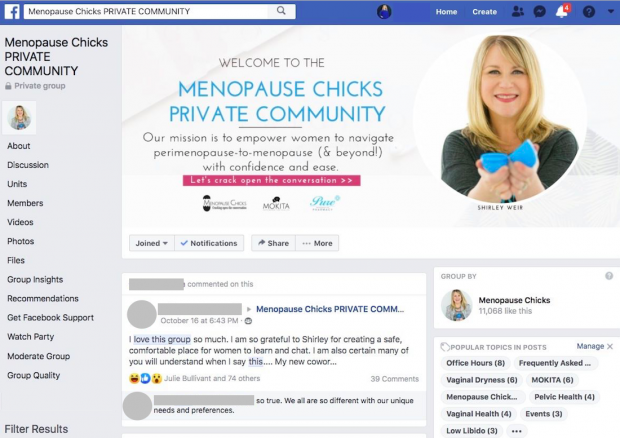
After Shirley listed it in a couple of media interviews, the group gained 5,000 new members in 60 days. There are now more than 17,600 members, all from organic development, producing 35,000 questions , comments, and reactions a month.
Check out our step-by - step guidance on how to set up your own Facebook community when you're ready to apply this tool to your Facebook marketing strategy.
Fans will also build their own Facebook community with an emphasis on your brand (to see this in action, check Facebook Groups for FitBit). To make sure that the dialogue is constructive and truthful, it is a good idea to join these groups.
This is a wonderful thing in general, though. It demonstrates that your brand has a committed fan base that is really into what you are doing!
Facebook groups are all about organic engagement for now, but eMarketer predicts that advertising will appear in groups in 2021.
Facebook chatbot (a.k.a. Facebook Messenger bot)
Every month, Facebook users exchange 20 billion messages with companies. Facebook's own research reveals that customers expect a company to respond almost instantly. One surveyed Facebook user said he would only wait 10 minutes for an answer before moving on to another brand.
Facebook indicates that the solution to this need for fast answers could be chatbots on Messenger. And they cite it as a reason why, in 2018 alone, the number of bots increased 5.6 fold.
For instance, Happy Socks used a Facebook Messenger bot as a kind of personal shopper, helping people on their Christmas list to find just the right gifts for everyone.
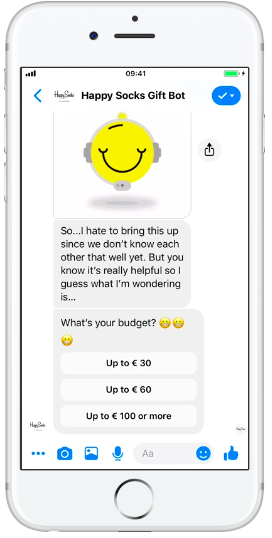
To set up your own Facebook chatbot, check out our step-by-step guide to creating a Facebook Messenger bot.
Facebook Business Manager
Until you understand the principles of your Facebook profile, setting up a Facebook Business Manager is a smart idea. Facebook calls it "a one-stop shop for the management of business tools, organization assets and access to these assets for employees."
It's a tool that helps you to monitor your Facebook posts, both organic and charged. It also helps you to collaborate with team members and outside contractors and agencies efficiently.
In our step-by - step guide to using Facebook Business Manager, we take you through the set-up process.
6. Connect Facebook ads and Facebook pixels
Just because you share something on your Facebook page doesn't mean it will be seen by all your fans. In fact, the percentage of followers your organic posts would likely hit can surprise you:
- For Pages with fewer than 10,000 followers: 8.18% organic reach
- For Pages with more than 10,000 followers: 2.59% organic reach
This is because the algorithm on Facebook prioritizes posts from friends and family of users.
Fortunately, without breaking the bank using Facebook Ads, you can expand your reach.
A Facebook ad is, like any advertising, content you pay to share with a particular, targeted audience. It's all about putting the brand in front of the right eyeballs and hitting your targets for conversion.
From brand recognition and interaction to app installations and store visits, Facebook has advertisement solutions tailored for business goals both on and off the network. An overview of how to set up a Facebook ad campaign is given in this video.
An important note here: Even if you don’t plan to use Facebook ads right away, it’s a good idea to set yourself up with a Facebook pixel now.
A Facebook pixel is a simple piece of code that you place on your website to:
- track conversions
- remarket to people who have already visited your website
- build targeted custom audiences for future ads
The pixel will start collecting data as soon as you place it on your site, so you’ll have remarketing and custom audience information ready when you start your first campaign.
7. Track, measure, and refine
Marketing on Facebook is not a technique of set-it-and-forget-it. You have to monitor success and calculate it so you can see what succeeded and what didn't. This will show how in the future you will strengthen your plan.
Through Facebook Insights, Facebook offers built-in audience engagement monitoring. You are able to measure:
- likes
- reach (how many people saw your posts)
- engagement (how many people liked, clicked, shared, or commented)
- which of your posts result in people unliking your Page
Facebook Insights will also help you determine which post types work best for your Page, so you’ll know if your current content mix is working.


No comments:
Post a Comment